
Do not lose the way
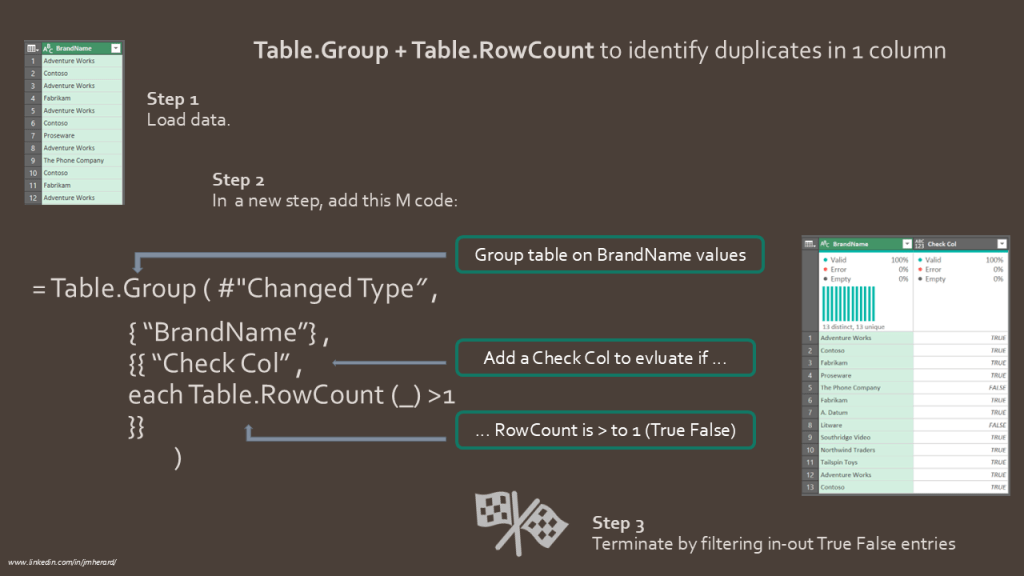
In this post, I show how to combine 2 table functions to identify and count duplicates in a column.
This can be a frequent task when you are reviewing cardinality in search of the perfect data model.
The M code is straight forward and nests Table.Group and Table.RowCount functions to achieve the result.
I use the each operator in the inner function to evaluate TRUE FALSE against each group’s count:
TRUE when Table.RowCount is greater to 1, FALSE if not.
You can run this code on a data set with many columns. However, expect the output to show only 2 columns: column to check & a true/ false Check Column.
#"New Step" = Table.Group ( #"Changed Type", {"BrandName"},
{{ "Check Column", each Table.RowCount (_) >1 }}
)
This slide will help you reproducing today’s query:
Going a step further…
Following the same logic, nothing prevent us to add a supplementary column to obtain a count on each value.
Refer to Step2 line in case you need to do so:
let
    Source = Excel.Workbook(File.Contents("C:\...\Demo.xlsx"), null, true),
    Table1_Sheet = Source{[Item="Table1",Kind="Sheet"]}[Data],
    #"Removed Other Columns" = Table.SelectColumns(Table1_Sheet,{"Column3"}),
    #"Promoted Headers" = Table.PromoteHeaders(#"Removed Other Columns", [PromoteAllScalars=true]),
    #"Changed Type" = Table.TransformColumnTypes(#"Promoted Headers",{{"BrandName", type text}}),

    /* Check column: TRUE FALSE for duplicates
    Step1 = Table.Group ( #"Changed Type" , {"BrandName"} , {{ "CheckCol" , each Table.RowCount (_) >     1 }} ) */

   /* Check Column TRUE FALSE + count column */
   Step2 = Table.Group ( #"Changed Type" , {"BrandName"} , {{ "CheckCol" , each Table.RowCount (_) > 1 } ,
     { "Count" , each Table.RowCount (_) , Int64.Type }} )

in
Step2
This time, data type do not matter
Let’s conclude with a good news. We are performing grouping and counting and you do not have to worry about data types.
This code can be used against Text, Number or Any type column indifferently.
A couple of screenshots to help you visualize the ouptut of today’s blog, as Step2 above command:


Hope you enjoyed this trick and you are get familiar with Power Query table functions.
 BI2020.blog
Leave a comment