
Please atomize my data!
I found myself exposed to a data quality issue and had not previously worked with non-printable characters in Power Query. This simple trick counts the number of Line Feeds #(lf) in each cell. Then, aggregate the count to determine the number of #(lf) per cell.
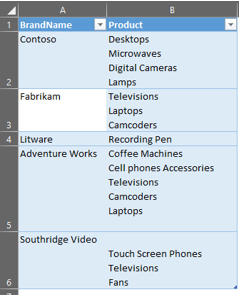
In following slides, you have the screenshots to use Split Column by Delimiter and Group By commands:

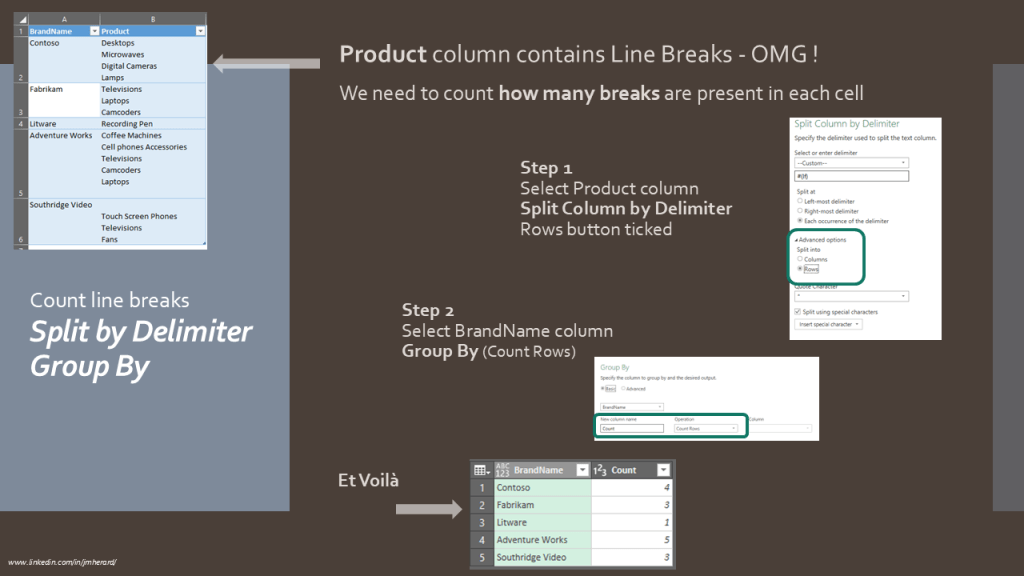
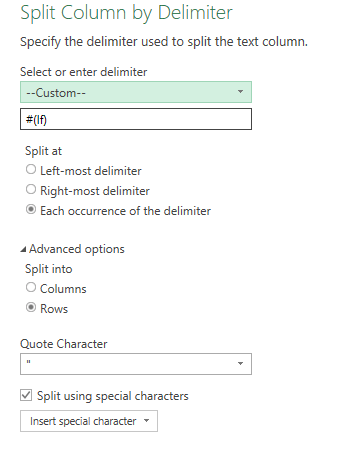
Following this logic
I selected a column of a dataset containing line feeds and hit “Replace Values”.
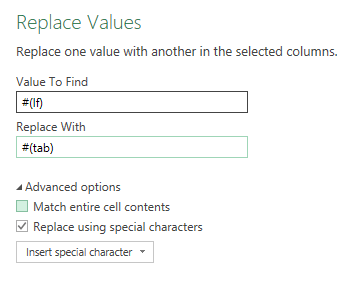
I found out, keying in “#(lf)” in the Value To Find box won’t work unless “Replace using special characters” ticked.

This is how I discovered the following Escape Sequences in Power Query:
| #(lf) | Line Feed |
| #(cr) | Carriage Return |
| #(tab) | Tabulation |
| #(cr)#(lf) | Carriage Return and Line Feed |
| #(00A0) | Non-breaking space |
… and finally discovered I could use those characters in Value To Find and Replace With boxes:
Hope you had fun, like me, with this Power Query use-case.
 BI2020.blog
Leave a comment